
Features
Everything a Sri Lankan HR and payroll team does each month
Built around the way payroll is actually run here: fingerprint machine files, EPF and ETF, APIT, Shop & Office Act leave, poya days, overtime at your own rates.
Monthly payroll with EPF, ETF and APIT
Start the month's run and every payslip is filled in from the employee records, approved leave and attendance. Check it, change what needs changing, then approve it. Approved months are locked, so last month's figures never move.
- EPF and ETF on basic pay plus the allowances you mark as EPF-liable
- APIT from the Inland Revenue tables (01, 02 and 05), tested against their worked examples
- Overtime at your own rates, including a second rate for Sundays and holidays
- No-pay days to two decimals, for late arrivals and part days
- Click any figure on a draft payslip to change it, with the reason kept
- Payslips to print or save as PDF, and employees see their own online
Bank, EPF, ETF and APIT files
Once a month is approved, download the files you need for paying salaries and filing returns. They open in Excel, with names written the way your bank and the EPF office expect them.
- Bank transfer file with every employee's account
- EPF C-form data, ETF and APIT schedules
- A payroll summary for the accounts
- Reminders on the Home screen: APIT by the 15th, EPF and ETF by the month end
Bulk entry and Excel import
For the figures that change each month, a spreadsheet-style table shows everyone at once. Type, use the arrow keys, or paste a block straight from Excel. Pasted rows find the right person by employee or EPF number. You can also import a whole .xlsx or CSV file.
- One row per person, one column per pay item
- Paste from Excel and rows match by EPF or employee number
- Import a file, and columns that aren't pay items yet can be added as new ones
- Nothing is saved until you press Save, and a paste can be undone
Attendance from your fingerprint machine
Export the punches from your fingerprint or card machine and import the file. BLACK WIDGETS HR reads Excel, CSV and text exports, works out the columns, and remembers the layout for next time. It then works out each day: present, late, short hours, overtime or absent.
- Reads Excel (.xlsx), CSV and device text files such as ZKTeco AttLog
- Shifts with grace time, breaks and overtime rules you set
- Night shifts that end the next morning
- A month that ends on the date you choose, such as the 26th to the 25th
- Enter attendance by hand, or mark people who don't use the machine as present unless marked absent
- Switch overtime off for people who aren't paid it, while late and no-pay still count
- One click fills the payroll's no-pay days and overtime
Rotating shifts and rosters
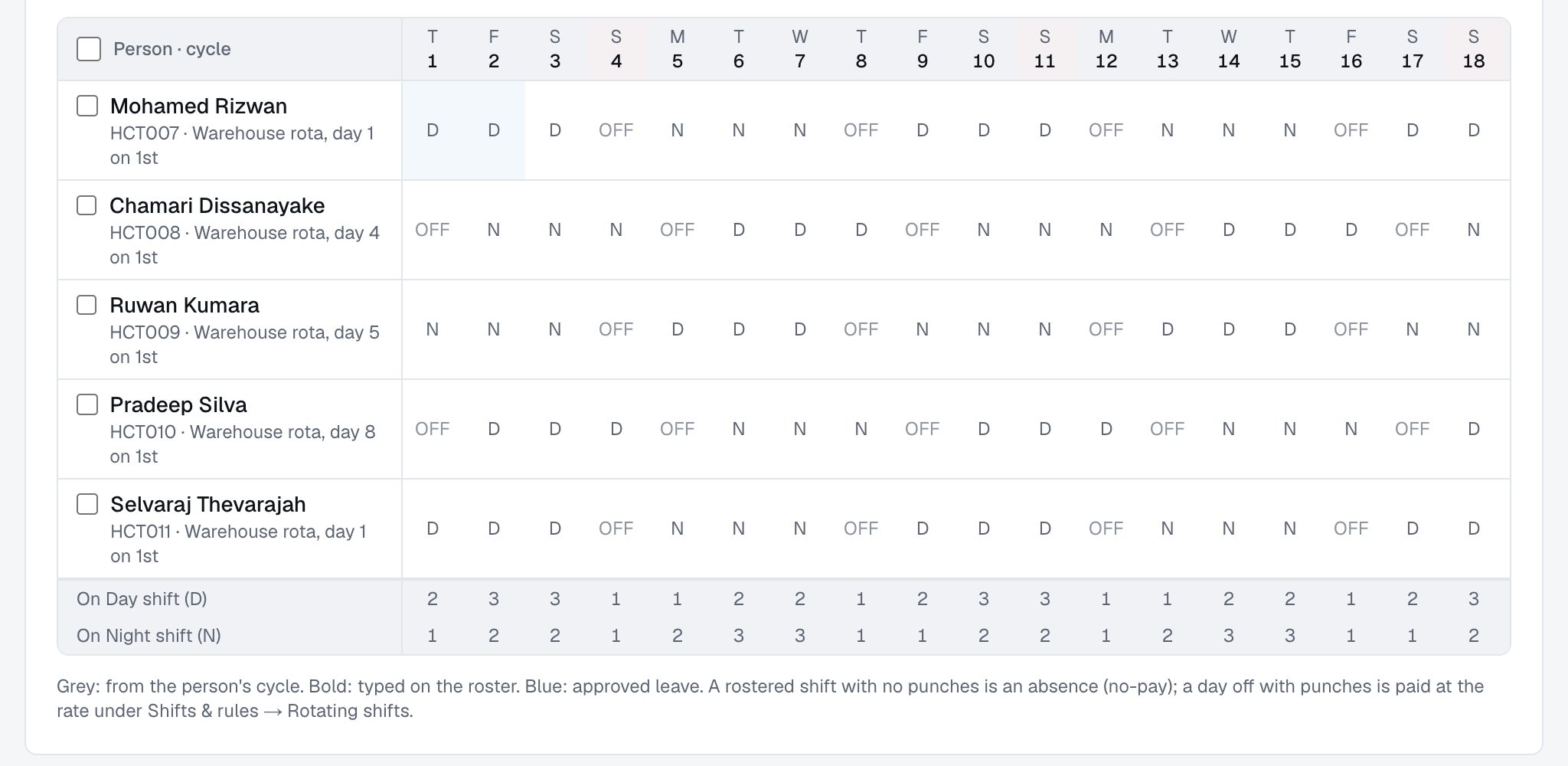
For factories and round-the-clock sites, set up the rotation once (say three days, a day off, three nights) and put people on it. The roster shows every person's month, and attendance and overtime follow it.
- Cycles such as “D D D OFF N N N”, typed the way you'd write them
- Changes apply from the month you choose, and earlier months never change
- Separate Sunday, holiday and day-off rates for shift staff
- Approve an early start for a day, so the extra hours count
- Download the roster to share or print
Leave and holidays
Leave types come set up with the Shop & Office Employees Act defaults, including the first-year rules. Balances update as leave is approved, and the gazetted public holidays, poya days included, are ready to import.
- Annual 14, casual 7, sick 7 and maternity 84 days to start with, all adjustable
- Requests, approvals, a team calendar and balance adjustments with reasons
- Saturdays as a working day, a half day or a day off
- Unpaid leave becomes no-pay on the payslip automatically
Loans and salary advances
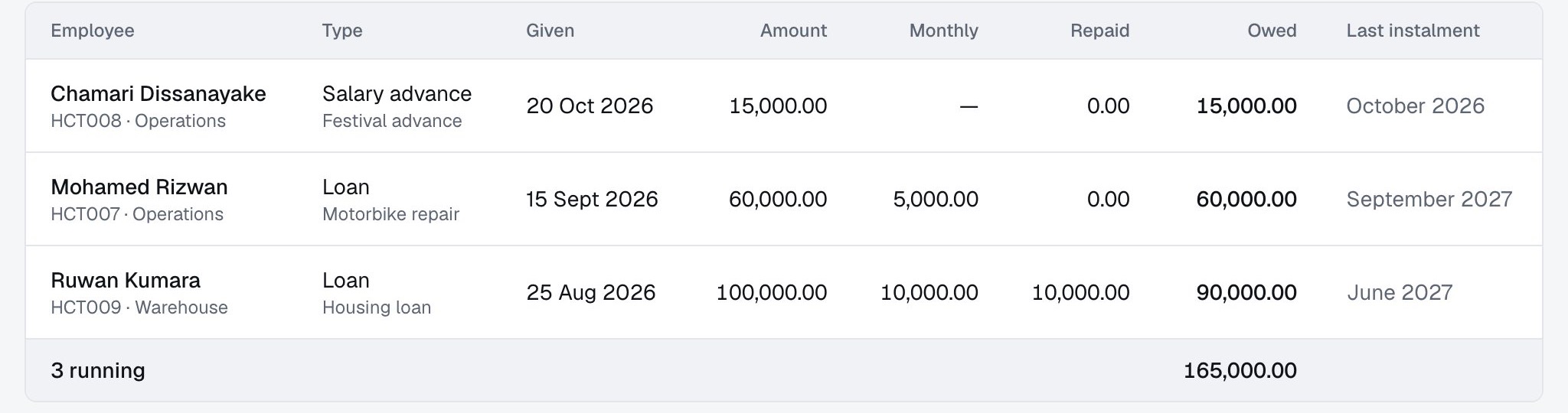
Record a loan or salary advance with its monthly instalment. It's deducted on every payslip until it's paid off, and the balance still owed is shown under the deduction.
- Instalments deducted automatically, starting in the month you choose
- Leave a month out, or record a repayment made in cash
- A warning when someone who is leaving still owes money
Employee records
Keep every employee's details in one record. NIC numbers are checked, and the date of birth and gender fill in from them. Allowances that are paid every month are set once on the record.
- Old and new NIC numbers validated
- Departments, joining and leaving dates, bank accounts
- Show names in full or with initials, across the app and its downloads
Roles, supervisors and an activity log
Invite your HR team, and give supervisors their own sign-in to request leave for their team, with HR approving. Employees can sign in to see their own leave and payslips. Every change is written to the activity log: who, what and when.
- Owner, HR admin, supervisor and employee roles
- Supervisors see and request leave for their own team only
- You choose whether supervisors' requests need HR's approval
- A full activity log of every change
Who sees what
- Owner
- Everything, including team access, billing and the activity log
- HR admin
- Employees, leave, attendance, payroll and loans
- Supervisor
- Their own team's leave: requests it, HR approves
- Employee
- Their own record, leave and payslips
Help built in
Every screen has help a click away: more than 30 guides written for the people who run payroll, with short clips showing each task. A first-time tour shows new users around.
- Guides matched to the page you're on
- Video clips of the main tasks
- A step-by-step Home screen for setting up and for each month
- Send us a message from inside the app
A few of the guides
- Your first month
- Everything from signing up to paying your staff, in order
- Running payroll
- Start the month, check the payslips, approve
- Importing attendance
- From the fingerprint machine file to no-pay and overtime
- Rotating shifts
- Cycles, the roster and Sunday rates
- Loans and advances
- Giving one, skipping a month, cash repayments
See it with real-looking data
The demo company has employees, leave and payroll already set up.