
HR & payroll for Sri Lankan businesses
Payroll, leave and attendance, without the spreadsheets.
Import the fingerprint machine file, approve the month's leave and run payroll with EPF, ETF and APIT worked out for you. Then download the bank and EPF files.
3-week free trial, then Rs 150 per employee a month. Already a customer? Sign in
- EPF 8% + 12% and ETF 3%
- APIT from the IRD tables
- Shop & Office Act leave
- Gazetted holidays and poya days
- Rs amounts, Sri Lankan NICs
Everything in one place
The whole month's HR work, from punches to payslips
One system for your employee records, leave, attendance, rosters, loans and payroll, so nothing has to be typed twice.
Monthly payroll with EPF, ETF and APIT
EPF 8% + 12%, ETF 3% and APIT worked out for every employee, every month.
Bank, EPF, ETF and APIT files
The month's bank transfer file, EPF C-form data, ETF and APIT schedules, ready to download.
Bulk entry and Excel import
Type the month's overtime, allowances and deductions into one table, or paste them from Excel.
Attendance from your fingerprint machine
Import the device file and get late arrivals, overtime and no-pay days worked out.
Rotating shifts and rosters
Day, night and 24-hour rotations, with a roster that knows who works when.
Leave and holidays
Annual, casual and sick leave with Shop & Office Act defaults and the Sri Lankan holiday calendar.
Loans and salary advances
Give a loan or an advance and the instalments come off each month's pay.
Employee records
Everyone in one place: NIC, EPF number, bank details, department and pay.
Roles, supervisors and an activity log
Owners, HR admins, supervisors and employees each see only what they should.
How a month works
Four steps, and the Home screen shows you which is next
Set up once: company, departments, employees, holidays and allowances. After that, every month follows the same path.
- 1
Attendance
Import the fingerprint machine file, or enter it by hand. Late, overtime and no-pay are worked out.
- 2
Leave
Approve the month's requests. Balances update, and unpaid leave becomes no-pay.
- 3
Run payroll
Every payslip is filled in. Add the month's extras in one table, check, and approve.
- 4
Pay & file
Download the bank file, EPF, ETF and APIT schedules, and share payslips.
Works the way you already do
Paste straight from Excel
Have the month's overtime or deductions in a spreadsheet? Paste the block into the bulk entry table and each row finds its person by EPF or employee number. Or import the whole file.
- Fingerprint machine files: Excel, CSV and ZKTeco text exports
- Your own overtime rates and no-pay rules, per employee or department
- An attendance month that ends on the date you choose, such as the 25th
- Overtime switched off for people who aren't paid it
For factories and round-the-clock sites
Rotating shifts and a roster that knows who works when
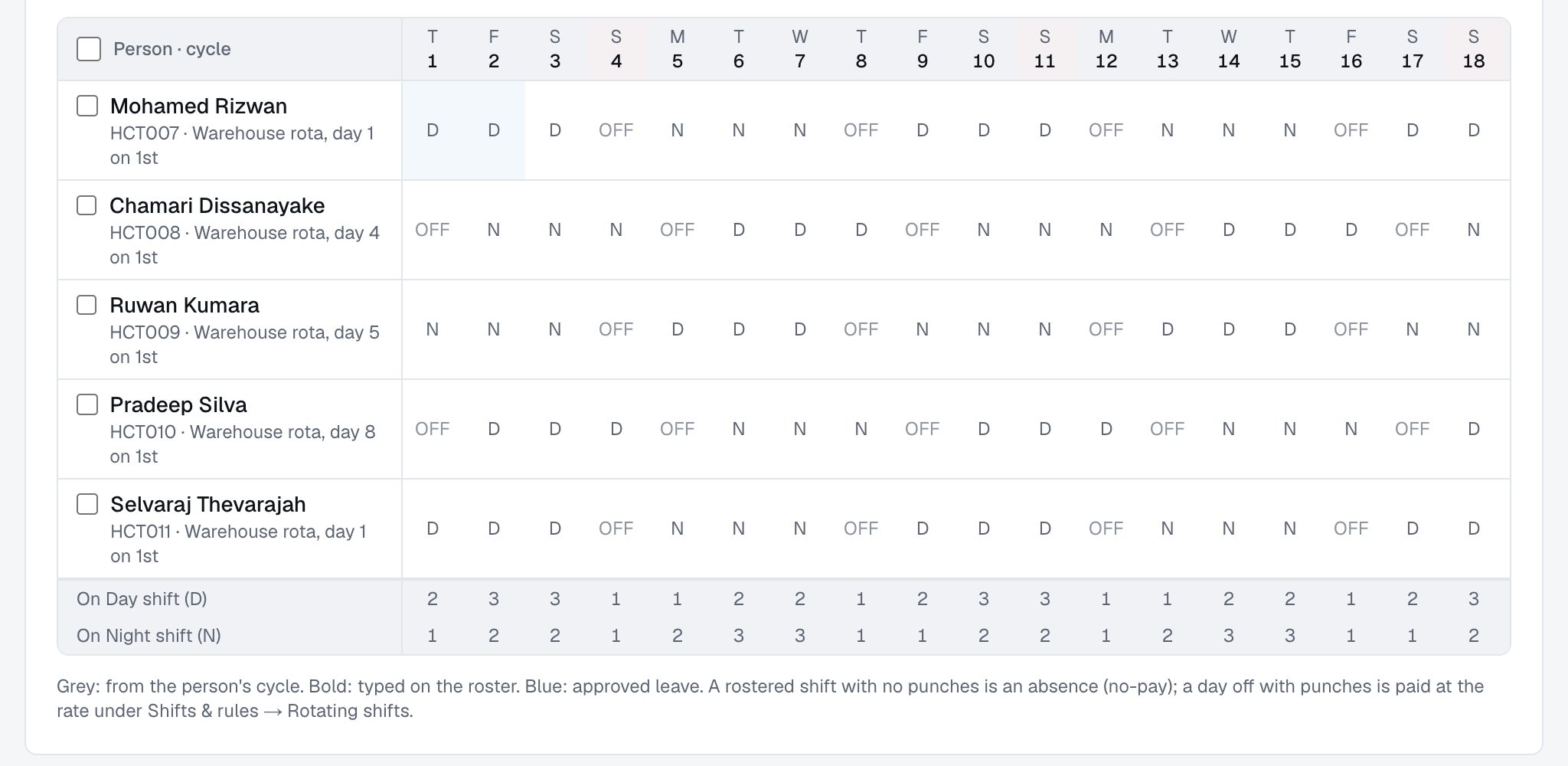
Set up the rotation once, such as three days, a day off and three nights, and put people on it. Attendance, overtime and Sunday rates follow the roster.
- Cycles typed the way you'd write them: “D D D OFF N N N OFF”
- Night shifts that end the next morning count on the right day
- Separate Sunday, holiday and day-off rates for shift staff
- Changes apply from the month you choose, and earlier months never change
- Approve an early start for a day, and download the roster to print
Loans and salary advances
Lend it once, and it comes back on every payslip
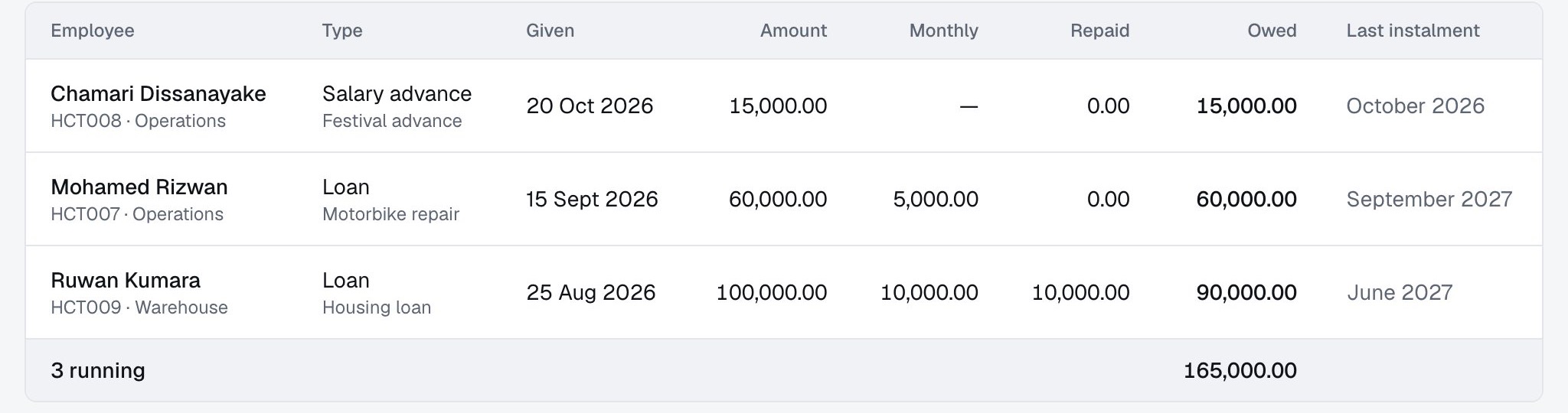
Record a staff loan or a salary advance with its monthly instalment. It's deducted each month until it's paid off, and the payslip shows what's still owed.
- Advances come off the next payroll in one go
- Leave a month out, or record money paid back in cash
- A warning when someone leaving still owes money
Try it now
Open the demo company
A made-up company with employees, leave and payroll already set up. One click, no sign-up. See it as the HR manager, or as an employee checking their payslip.
Simple pricing
Rs 150per employee, per month
Everything included, for every employee. Minimum 50 employees. Start with a 3-week free trial, then pay by bank transfer each month.